BingX CFD is a leveraged trading product that brings traditional financial markets directly into the BingX ecosystem. Built for users who want exposure beyond crypto, it provides access to gold, stock indices, forex, and commodities without requiring ownership of the underlying asset or a separate brokerage account.
Alongside BingX TradFi perpetual contracts, CFDs offer another way to trade many of the same markets through a different account structure, cost model, and trading schedule. This guide explains how BingX CFDs work, how they compare with TradFi perpetuals, what fees to expect, and how to place your first trade.
Key Takeaways
BingX CFD gives traders a new way to access traditional markets from within the BingX ecosystem. Before placing a trade, it is important to understand how the product works, how funds are held, and how it differs from perpetual contracts.
- Trade price movements without owning the asset: A CFD is an agreement to exchange the price difference between opening and closing a position, allowing traders to profit from rising or falling prices without owning the underlying asset.
- Access traditional markets through BingX: BingX CFD runs on the MetaTrader 5 (MT5) engine and covers metals, stock indices, forex, and commodities. Trades can be placed directly through the BingX App or website without downloading MT5.
- Use USDT as collateral through USDx: Funds are transferred from USDT into a dedicated CFD account and held as USDx at a 1:1 ratio. When withdrawn, USDx converts back to USDT at the same ratio.
- CFDs and perpetual contracts work differently: The two products differ in their interface, holding costs, trading hours, and liquidation rules. CFDs use swap fees and traditional market hours, while perpetual contracts use funding rates and generally trade around the clock.
- Leverage increases both opportunity and risk: CFD leverage can magnify profits, though it can also accelerate losses and result in the loss of the full margin. The product is better suited to experienced traders with clear risk controls.
What Is a CFD?
A CFD, or contract for difference, is a common TradFi derivative that lets traders speculate on an asset’s price without owning the asset itself. Profit or loss is based on the difference between the opening and closing price of the position.
Common CFD markets include forex pairs, stock indices, individual stocks, commodities, and precious metals such as gold and silver. Instead of buying and storing physical gold, purchasing every stock in an index, or opening a separate forex account, traders can use CFDs to gain price exposure more directly. CFDs also support both long and short positions, allowing traders to trade rising or falling markets.
CFD availability depends on local regulations. The product is restricted in some jurisdictions and is not available to U.S. retail investors. Access through BingX therefore varies by region.
How Does a CFD Work?
Every CFD trade is built around three main elements:
- Leverage: Margin lets traders control a larger position with less capital. The available leverage varies by instrument, and it magnifies both gains and losses, so even small price movements can significantly affect the account.
- Trade direction: Traders go long when they expect prices to rise and short when they expect prices to fall.
- Profit and loss: P&L depends on the difference between the opening and closing price, adjusted for contract quantity and contract multiplier. Trading costs may reduce the final result.
Order P&L = (Closing price − Opening price) × Contract quantity × Contract multiplier
For long positions, prices must rise above the entry level to generate a profit. For short positions, prices must fall. Spreads, commissions, and overnight swap fees are deducted from the gross result.
Because leverage also magnifies losses, traders should manage position size, available margin, and stop-loss levels carefully. A sharp adverse move may trigger liquidation.
How Does BingX CFD Work and Why Trade CFDs on BingX?
BingX CFD gives users access to traditional markets through a dedicated CFD account powered by the MetaTrader 5 (MT5) engine. Traders can place and manage orders directly in the BingX App or on the web, while the MT5 desktop platform remains optional for advanced charting, technical indicators, and automated strategies.
To fund the account, users transfer USDT into the CFD account, where it appears as USDx at a 1:1 ratio. USDx is an internal accounting unit used as trading margin rather than a separate cryptocurrency. It cannot be deposited or withdrawn directly, and converts back to USDT at the same ratio when funds are transferred out. BingX CFD supports several major traditional asset classes:
|
Asset class |
Representative instruments |
|
Metals |
Gold (XAUUSD), silver (XAGUSD) |
|
Stock indices |
US S&P 500, Nasdaq, Dow Jones and other major indices |
|
Forex |
EUR/USD, GBP/USD and other major and cross pairs |
|
Commodities |
Crude oil, natural gas and others |
BingX CFD combines several practical benefits:
- Unified cross-margin account: Forex, metals, stock indices, and commodities are managed from one account, with margin shared across positions.
- Low barrier to entry: Verified BingX users can access traditional markets without opening a separate brokerage account.
- Two fee modes: The standard mode includes costs in the spread, while the ultra-low-spread mode offers tighter pricing with a separate commission.
- Optional MT5 tools: Traders can use MT5 for advanced charts, technical indicators, and Expert Advisors while keeping the same BingX CFD account.
- Broad market access: Users can trade major global markets across their regular trading sessions without switching platforms.
BingX also aggregates prices from multiple institutional liquidity providers, helping support competitive spreads and reduce slippage on larger orders.
BingX CFD vs. BingX TradFi Perpetuals: What Are the Key Differences?
BingX CFD and BingX TradFi perpetual contracts both let traders gain leveraged exposure to traditional assets without owning the underlying instrument. The main differences are the trading system, account structure, holding costs, market hours, and liquidation method.
|
Feature |
BingX CFD |
BingX TradFi perpetual contracts |
|
Interface |
BingX App, web, or optional MT5 terminal |
BingX native contract interface |
|
Account |
Dedicated CFD account, with USDT displayed as USDx |
Existing contract account funded with USDT |
|
Holding cost |
Swap fee charged at the daily server settlement time |
Funding rate exchanged between long and short positions at set intervals |
|
Trading hours |
Follows the underlying market and usually closes on weekends |
Generally available 24/7 |
|
Liquidation basis |
Based on margin ratio and Bid/Ask prices |
Based on the mark price |
|
Order sizing |
Uses standard lot sizes |
Uses contract-based order sizes |
The holding-cost structure is especially important for positions kept open overnight. CFDs charge a swap fee when a trade passes the daily settlement time, while BingX TradFi perpetual contracts use periodic funding payments to keep the contract price aligned with the underlying market. The cheaper option can vary depending on the instrument, position direction, and holding period.
BingX CFD is generally better suited to traders who want MT5 tools, broker-style order sizing, and access that follows traditional market sessions. BingX TradFi perpetual contracts may be more familiar to crypto traders who prefer the native BingX contract interface, USDT settlement, and round-the-clock trading. Traders can use either product depending on the asset, strategy, trading hours, and expected holding cost.
What Does It Cost to Trade CFDs on BingX?
BingX CFD trading costs come from three main sources: the spread, commission, and overnight swap fees. Traders can choose between two fee modes depending on how often they trade and whether they prefer simpler pricing or tighter spreads.
|
Item |
Zero-Fee Mode (Default) |
Ultra-Low-Spread Mode |
|
Activation |
Available by default |
Requires an application and minimum asset threshold |
|
Spread |
Standard spread |
Tighter institutional-style spread |
|
Commission |
No separate commission; costs are included in the spread |
Fixed commission charged per lot |
|
Symbol format |
Uses the .s suffix, such as XAUUSD.s |
No suffix, such as XAUUSD |
|
Best suited for |
New, occasional, and lower-frequency traders |
High-frequency and automated traders |
- Zero-Fee Mode is the default option. Trading costs are included in the buy-sell spread, so there is no separate commission. This simpler structure is generally more suitable for beginners and traders who do not need the tightest available pricing.
- Ultra-Low-Spread Mode provides tighter spreads with a separate fixed commission per lot. It requires an application and becomes available after the CFD account meets the required asset threshold. This mode is better suited to active traders, larger orders, and automated strategies where lower spreads may offset the added commission.
Both modes may also charge or credit a swap fee when a position remains open past the daily MT5 settlement time. Swap rates vary by instrument and position direction, and they can accumulate over longer holding periods. Traders should therefore check the spread, commission, and current swap rate before opening a position.
How to Trade CFDs on BingX: A Step-by-Step Guide
Trading CFDs on BingX takes four main steps through the BingX App or website. The MT5 desktop terminal and WebTrader are optional for traders who want more advanced tools.
Step 1: Open a BingX CFD Account
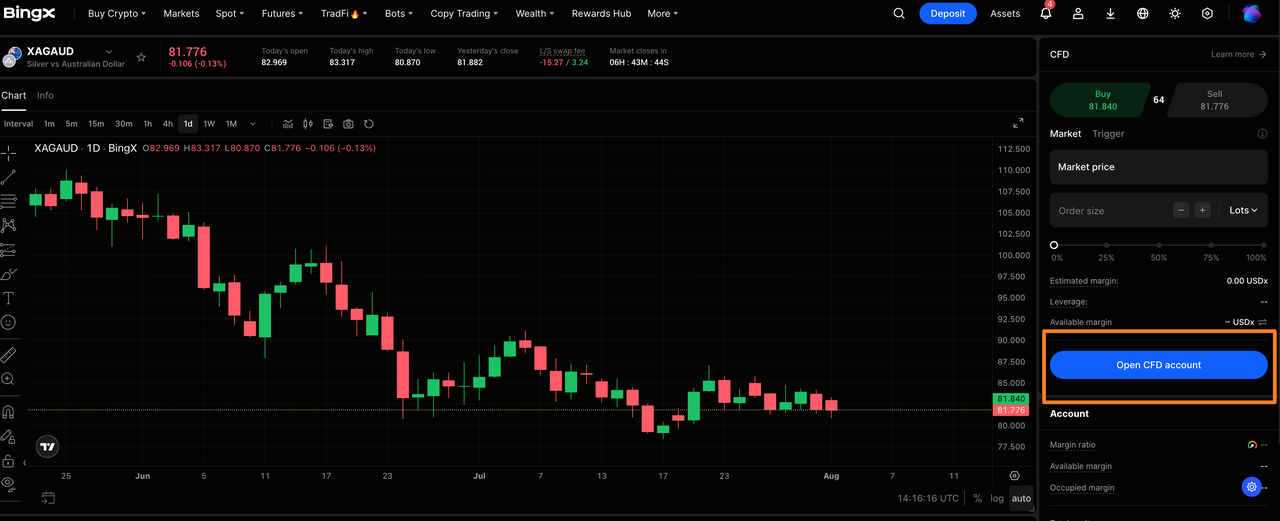
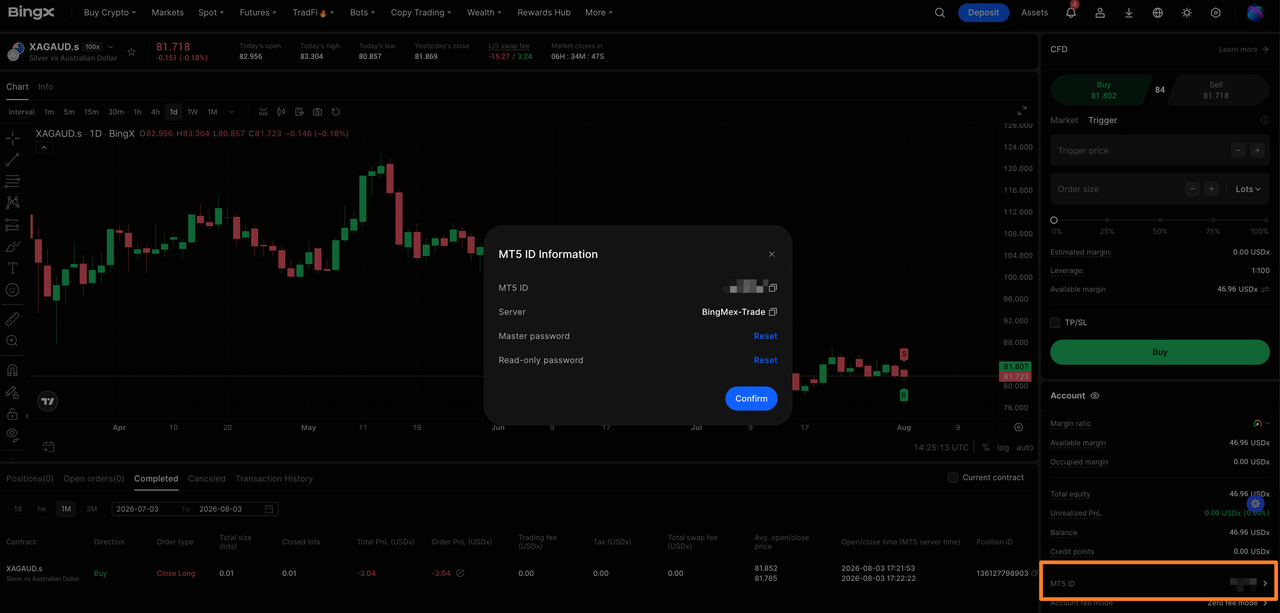
Go to TradFi > CFD and open the CFD trading page. Activate a CFD account if you do not already have one. BingX will display your MT5 ID and server address, which you can save for future MT5 access.
Step 2: Transfer Funds to the CFD Account
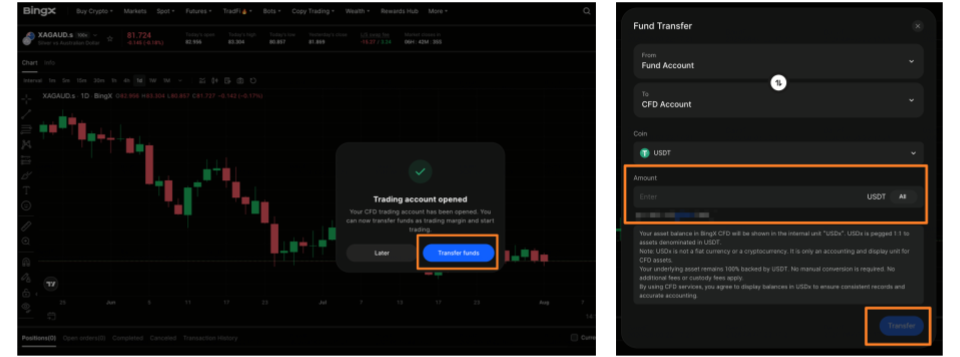
Select "Transfer" and move USDT from another BingX account into the dedicated CFD account. The funds are displayed as USDx at a 1:1 ratio and used as margin for CFD positions.
Step 3: Choose an Instrument and Place an Order
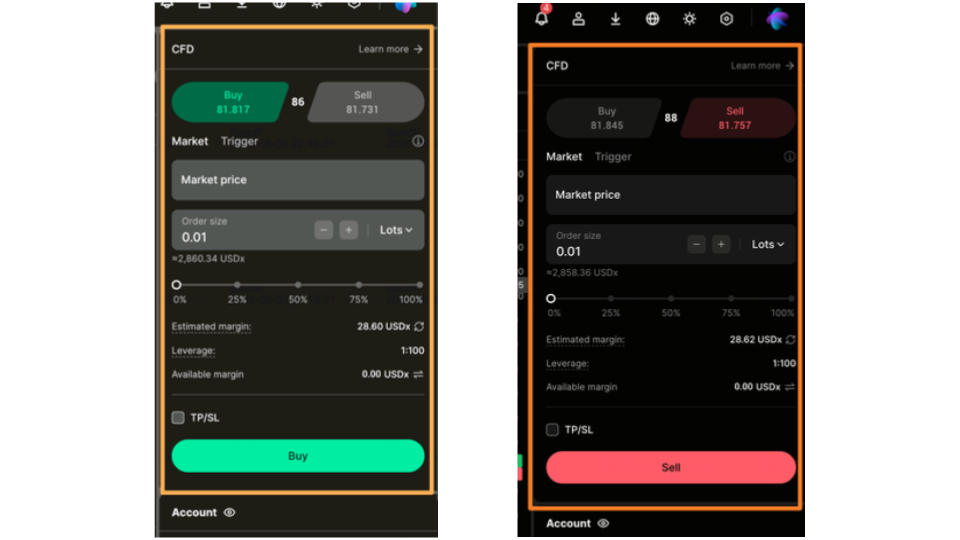
Browse metals, stock indices, forex, and commodities, or search for an instrument by symbol. Then:
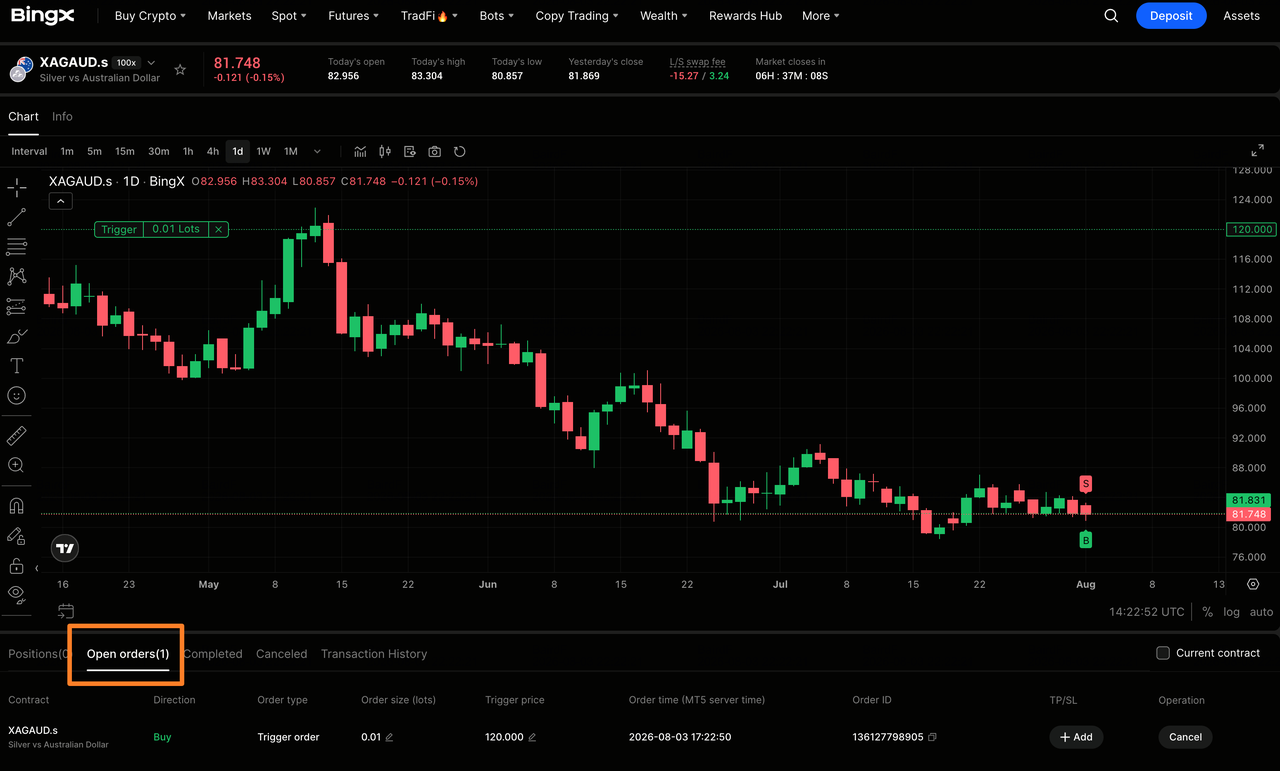
- Select a "market order" for immediate execution or a "trigger order" that activates at a specified price.
- Enter the trading volume in lots.
- Select "Buy" to open a long position or "Sell" to open a short position.
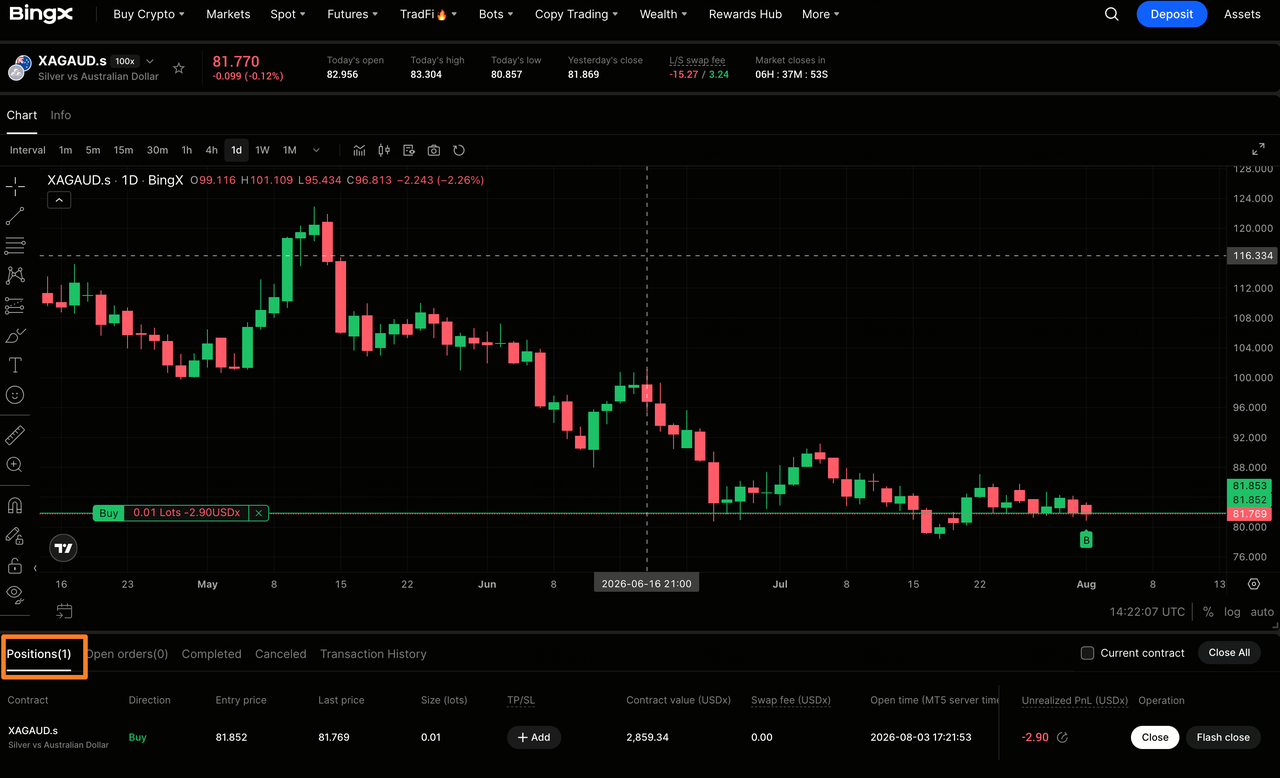
After execution, the position and unrealized profit or loss appear in the Positions tab.
Step 4: Manage or Close the Position
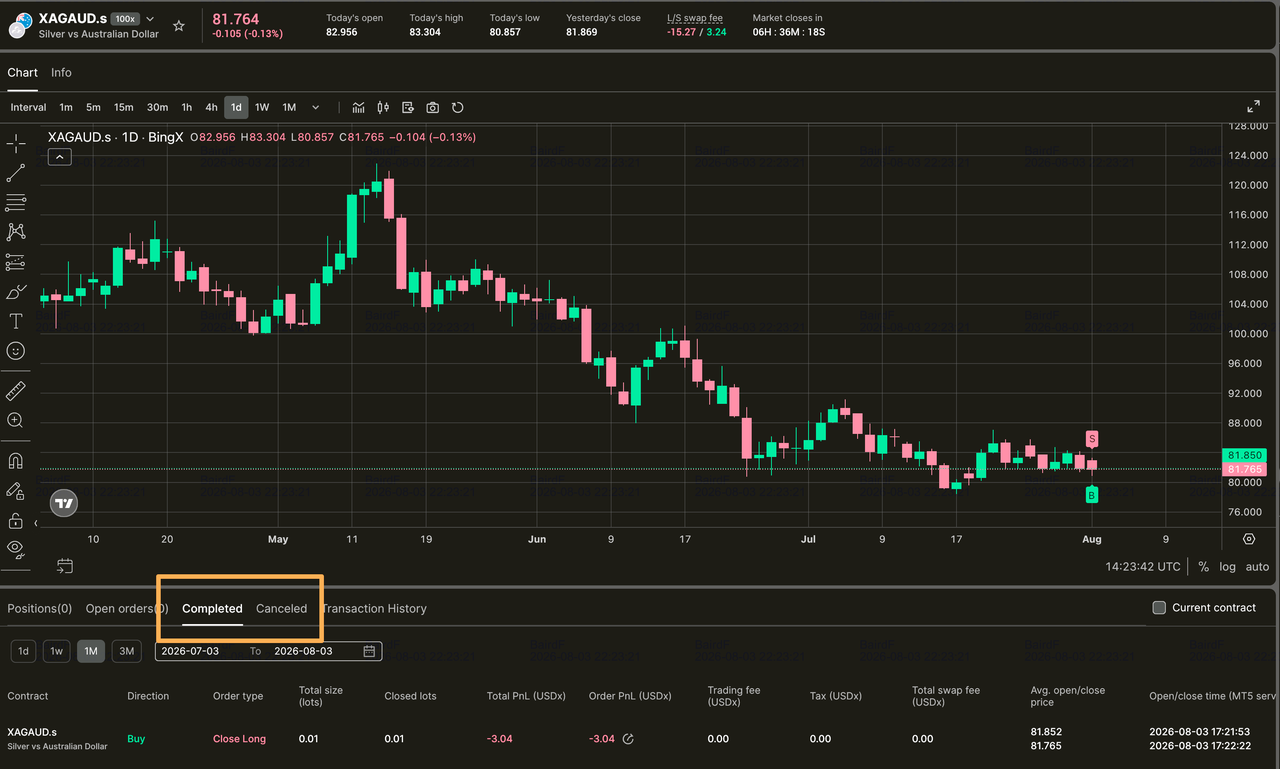
Open the "Positions" tab to review active trades, adjust risk controls, or close a position manually. Unfilled trigger orders appear under "Current Orders", while settled trades are available under "Completed Orders".
 |
 |
 |
How Advanced Traders Can Trade BingX CFDs Through MT5
For advanced traders, the MT5 desktop terminal and WebTrader provide access to deeper charting, technical indicators, and automated strategies while connecting to the same BingX CFD account. Set a separate MT5 trading password in your BingX settings, then log in using your MT5 ID, password, and the Bingmex server. Your balance, positions, and orders sync across BingX and MT5 in real time, so avoid managing the same trade from multiple terminals at once.
Top 5 Risks Investors Should Know Before Trading BingX CFDs
BingX CFDs use leverage and follow traditional market conditions, so traders should understand the main risks before opening a position.
- Leverage can magnify losses: Even a small adverse price move can consume a large share of the deposited margin. Conservative position sizing and stop-loss orders are essential.
- Positions may be liquidated: If the account margin ratio falls below 50%, BingX may force-close positions using the Bid or Ask price. Keeping sufficient available margin can reduce this risk.
- Swap fees can accumulate: Positions held past the daily settlement time may incur overnight swap fees. These costs can materially reduce returns on trades held for several days.
- Markets can close while positions remain open: CFD instruments follow traditional trading hours and may pause on weekends, holidays, or during maintenance. Traders may be unable to adjust positions during these periods.
- Availability varies by region: BingX CFDs are limited to eligible users in supported jurisdictions. Access and product rules may change based on local regulations.
Final Thoughts: Is BingX CFD Right for You?
BingX CFD offers another way to trade traditional markets alongside BingX TradFi perpetuals. It provides access to MT5 tools, multiple asset classes, and a unified cross-margin account, while TradFi perpetuals may suit traders who prefer the native BingX interface and longer trading hours. The better choice depends on your strategy, preferred tools, and expected holding period.
Because CFDs use leverage, small market moves can cause significant losses or liquidation. Traders should understand the fees, margin rules, and trading hours, use careful position sizing, and trade only with funds they can afford to lose.
Related Reading
- Gold CFDs vs. Gold Perpetual Futures vs. Tokenized Gold (XAUT): Key Differences and Which Should You Choose?
- How to Trade Crude Oil CFDs on BingX: WTI, Brent and Oil Market Trading Guide (2026)
- How to Trade Index CFDs on BingX: S&P 500, Nasdaq 100, Nikkei 225, and More (2026)
FAQs About Trading CFDs on BingX
1. Do I need to download MT5 to trade CFDs on BingX?
No. You can trade directly through the BingX App or website. MT5 is optional for advanced charting, technical indicators, and automated strategies.
2. What is USDx, and is it a cryptocurrency?
USDx is the internal accounting unit used in the BingX CFD account. USDT transferred into the account is displayed as USDx at a 1:1 ratio. It is not a cryptocurrency and cannot be deposited or withdrawn directly.
3. Can I transfer funds back to my main BingX account?
Yes. Available USDx can be transferred back and converted to USDT at a 1:1 ratio. Margin tied to open positions must first be released by closing those positions.
4. How are BingX CFDs different from BingX TradFi perpetuals?
BingX CFDs use a dedicated MT5-based account, swap fees, traditional market hours, and Bid/Ask-based liquidation. BingX TradFi perpetuals use the native contract interface, funding rates, broader trading hours, and mark-price liquidation.
5. What leverage does BingX CFD offer?
Leverage varies by instrument and asset class and is set by the platform. Traders should check each instrument’s contract specifications before placing an order.
6. What order types are available?
BingX CFD supports market orders and trigger orders. Market orders execute at the current available price, while trigger orders activate once the specified price is reached.
7. What happens if the market moves against my position?
The position records a floating loss. If the account margin ratio falls below 50%, the system may force-close positions. Maintaining a margin buffer and using stop-loss orders can help manage this risk.
8. Where is BingX CFD available?
BingX CFD is available only to eligible users in supported regions and is unavailable in some jurisdictions, including the United States. Check the CFD page or contact BingX customer support to confirm access.
