

For Monero (XMR) holders, being able to obtain accurate market prices at the first moment often determines the success or failure of trading results. Price information is not only the basis for observing the market, but also an indispensable foundation for adjusting positions, planning entry and exit, and evaluating asset allocation. In actual operations, the XMR/USD quotes presented by each platform are not the same, involving multiple factors such as matching data sources, quote update logic, and order book depth. The overall trading volume of privacy coins is already more concentrated than BTC and ETH, and many mainstream platforms have successively removed XMR spot trading, making compliant sources for obtaining real-time quotes even more limited. These factors will further widen the price differences between different tools.
When information is concentrated on a single platform, users can easily miss cross-market price signals and may make unfavorable decisions due to quote delays. Therefore, combining multiple data sources and selecting appropriate tools according to needs is a basic skill that every XMR investor should develop. For Taiwanese users, the key to this task is not just "finding quotes," but organizing a price-checking process that they can understand, use smoothly, and directly connect to operations.
The following content will start with cross-platform price comparison tools, then move to desktop market data and analysis tools, and finally extend to mobile app application scenarios. Each tool will explain its pricing logic, suitable use cases, and functional differences to help you filter out combinations that match your trading rhythm, ensuring every buy and sell decision is built on a more solid information foundation.
Key Takeaways
- XMR/USD quotes are inconsistent across different exchanges. It's recommended to use at least two sources: use exchange order books as the basis for actual transactions, and use aggregation platforms like CoinGecko or CoinMarketCap to confirm market consensus.
- Cross-exchange price comparison tools can display XMR quotes, spreads, and trading depth from various platforms on a single page. This is particularly valuable for privacy coins with liquidity concentrated on a few platforms, helping avoid slippage losses from entering low-liquidity markets.
- BingX provides Traditional Chinese XMR/USDT perpetual futures trading for Taiwanese users, integrating BingX AI and copy trading functions. Both desktop and mobile apps support price alert settings, making it a suitable choice for daily tracking and actual operations.
- Kraken Pro still maintains direct XMR/USD trading pairs, being one of the few compliant large platforms where you can directly hold XMR spot in USD denomination, suitable as a supplementary tool for investors holding long-term spot positions.
- TradingView has complete functions for chart analysis and multi-condition alerts. The free version can meet most needs of individual investors and can form a "TradingView analysis, BingX execution" workflow.
Best Multi-Platform XMR Price Comparison Tools: Compare Quotes and Spreads Across Exchanges
Before actually trading XMR, cross-platform price comparison is the most easily underestimated step that directly affects trading results. The XMR/USD quote differences between exchanges are more significant than BTC and ETH, mainly because XMR's compliant liquidity is concentrated on a few platforms. When market volatility is high or during off-peak hours, spreads can instantly widen. For small transactions, this difference may not be painful; but for medium to large exchanges, the cumulative cost of a few percentage points cannot be ignored.
Through price comparison tools, users can simultaneously see XMR quotes, bid-ask spreads, and trading depth from multiple platforms on a single interface, selecting the most favorable trading venue under current conditions rather than blindly using a single familiar platform. Below are two of the most commonly used XMR price comparison sources:
1. CoinGecko Market Comparison
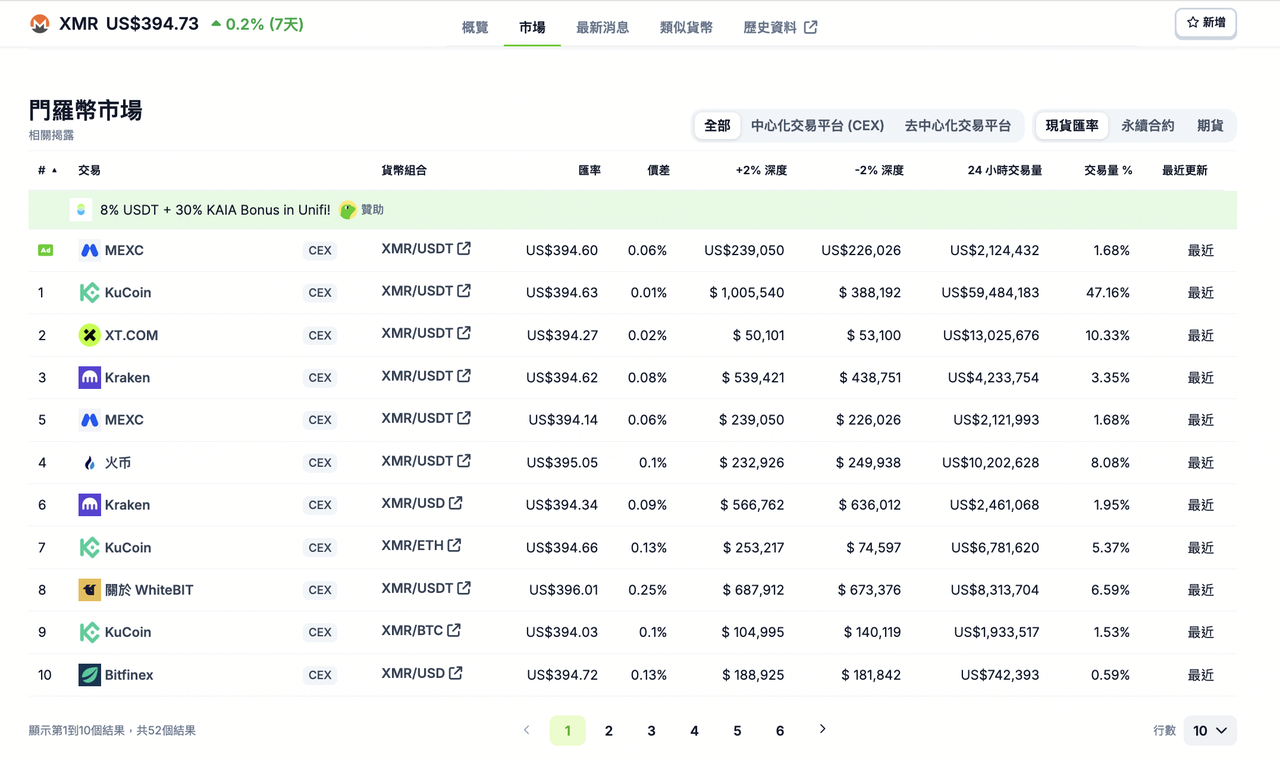
After entering CoinGecko's XMR coin page and switching to the "Markets" tab, you can see a list of XMR/USD and XMR/USDT quotes from major global exchanges, along with 24-hour trading volume, bid-ask spreads (±2% depth), and latest update times. Taiwanese users can use this page to quickly compare Kraken, KuCoin, HTX, and other platforms supporting XMR, selecting options with better depth and narrower spreads at the moment. CoinGecko uses volume-weighted averages of transaction prices from various exchanges, with update frequencies around 1-2 minutes, which is sufficient as a reference before entering positions, but not suitable for high-frequency strategies requiring second-level updates.
2. CoinMarketCap Market Comparison
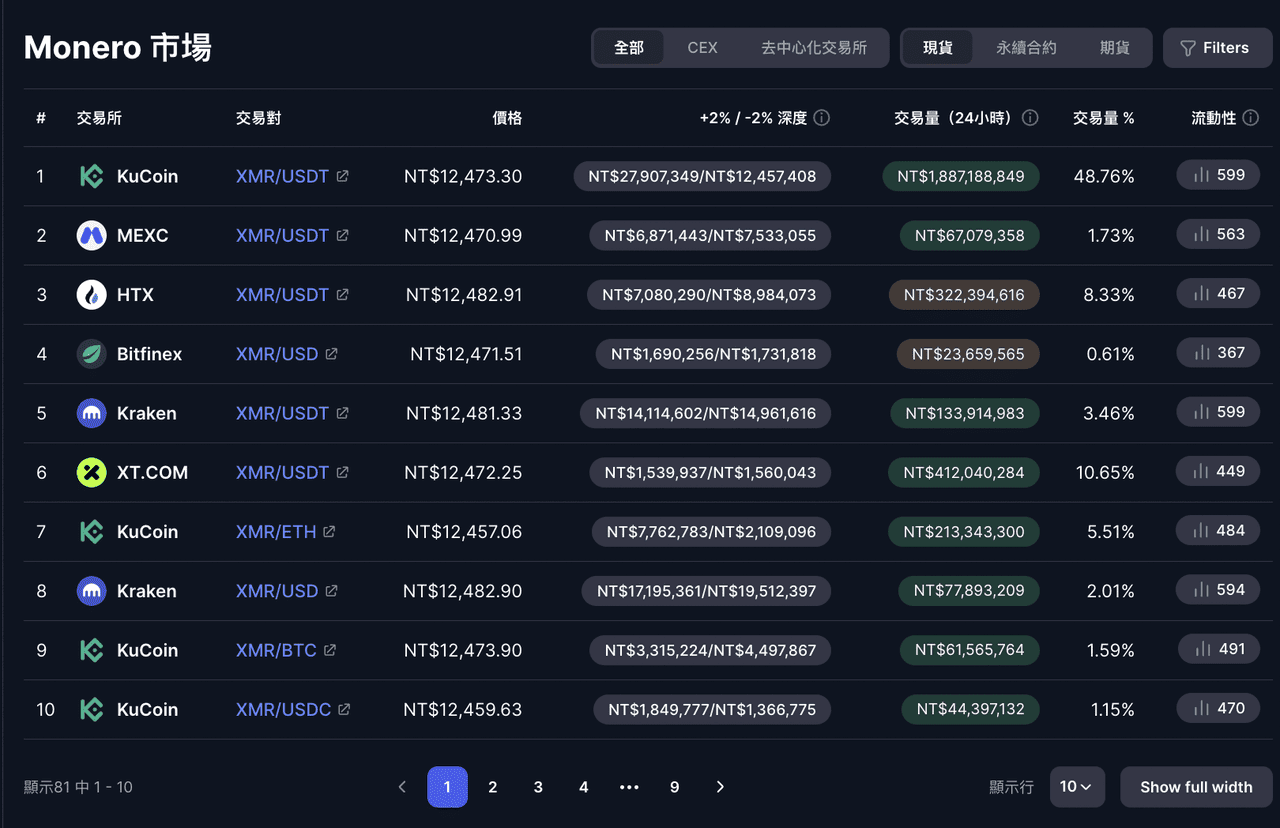
CoinMarketCap's coin page also has a "Markets" tab with a presentation similar to CoinGecko, but the interface is more user-friendly for general investors with important information at a glance. It additionally provides a "Liquidity Score" indicator that can assess the credibility of quotes from various exchanges, helping users filter out platforms with inflated trading volumes or insufficient actual depth. For assets like XMR where liquidity is concentrated on a few platforms, this scoring mechanism's practicality is more evident than for general mainstream coins. In practical operations, CoinMarketCap and CoinGecko complement each other, and cross-verification can be done before major decisions to improve accuracy.
Multi-Platform XMR Price Comparison Tool Overview
|
Tool |
Quote Source |
Update Frequency |
Suitable Use |
|
CoinGecko Markets Tab |
Aggregated exchange transaction prices |
About 1-2 minutes |
Quick comparison of spreads and liquidity across exchanges before entry |
|
CoinMarketCap Markets Tab |
Aggregated exchange transaction prices |
About 1-2 minutes |
Assess quote credibility with liquidity scoring |
Best Desktop XMR Live Price Tracking Tools: Charts, Analysis, and Market Data
When tracking XMR prices, desktop tools often serve as the central hub of the entire tracking process due to their large screen space and complete information presentation. Mobile apps are suitable for quick price checks and receiving alerts, but for multi-window analysis, depth chart observation, and technical interpretation, desktop versions remain irreplaceable. For users who want to reduce switching costs in the "market observation → condition judgment → actual order placement" process, choosing the right desktop tools has an impact no less than selecting the trading platform itself.
1. BingX
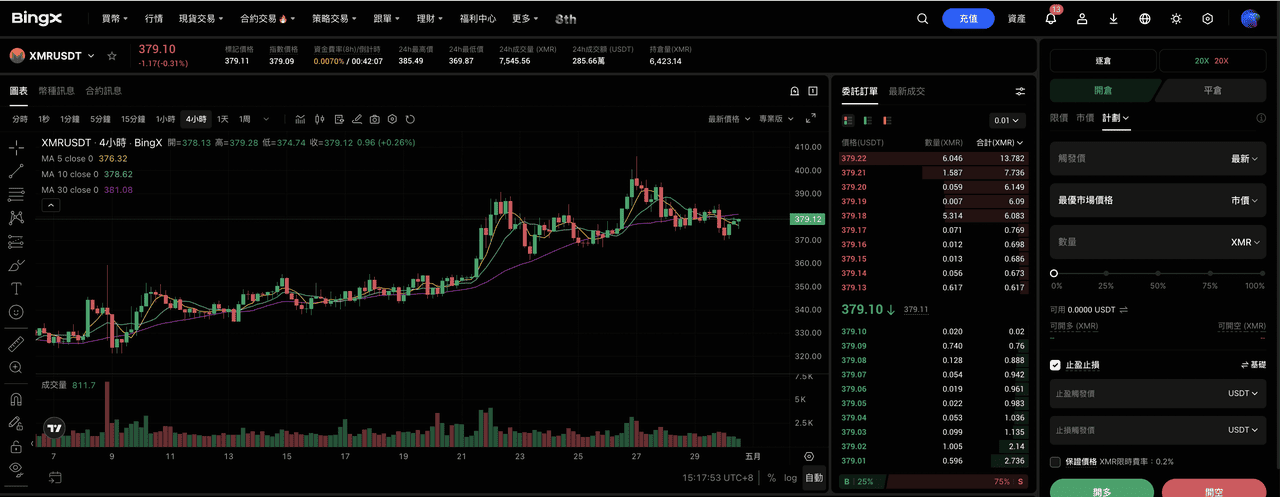
For Taiwanese XMR investors, BingX is one of the few desktop platforms that can provide a "market data, AI analysis, and futures execution" one-stop experience in a Traditional Chinese environment. Let me first clarify an important premise: BingX currently does not offer XMR spot trading but provides XMR/USDT perpetual futures. For investors who don't intend to hold spot but only want to participate in XMR price movements, this option can still meet core needs. The entire interface from registration, market pages to customer service is in Chinese. XMR/USDT perpetual futures' real-time quotes, order books, depth charts, and transaction records are all concentrated on the same page, saving time from switching between multiple platforms.
BingX's quotes come directly from the platform's order book. Perpetual futures have a maker fee of 0.02% and taker fee of 0.05%, which is relatively low compared to most futures platforms in the market. Funding rates are settled every 8 hours, corresponding to 8:00, 16:00, and 0:00 Taiwan time. In terms of analytical capabilities, BingX AI integrates historical trends and technical signals to generate structured market observations. For beginners, this can save a lot of time from manually interpreting charts, while for advanced users, it provides an additional layer of cross-verification. For those unfamiliar with futures operations but wanting to participate in XMR market movements, BingX's copy trading function allows users to directly replicate experienced traders' strategies, combined with BingX Academy's Traditional Chinese educational content, making the overall learning curve relatively gentle.
BingX Desktop Key Features
- Full Traditional Chinese Interface: From market data, futures trading to customer service, everything is in Chinese, with operation logic friendly to Taiwanese users, reducing the chance of misreading or misplacing orders.
- XMR/USDT Perpetual Futures: 0.02% maker, 0.05% taker fees. Platform order book real-time transaction prices directly correspond to actual order conditions, with no gap between displayed and executed prices.
- Integrated TradingView Charts: Built-in technical analysis tools, moving averages, MACD, RSI and other indicators can be directly applied, with switching from minute to monthly charts.
- BingX AI Market Analysis Assistance: AI integrates XMR's historical data and current signals to help users quickly grasp trend direction.
- Copy Trading Function: You can choose traders with stable performance to automatically replicate XMR strategies, especially suitable for those who are not good at futures interpretation but want to participate in the market.
- Price Alerts and Trading Integration: After target price alerts are triggered, users can directly jump from notifications to the order page, significantly shortening reaction time.
2. TradingView
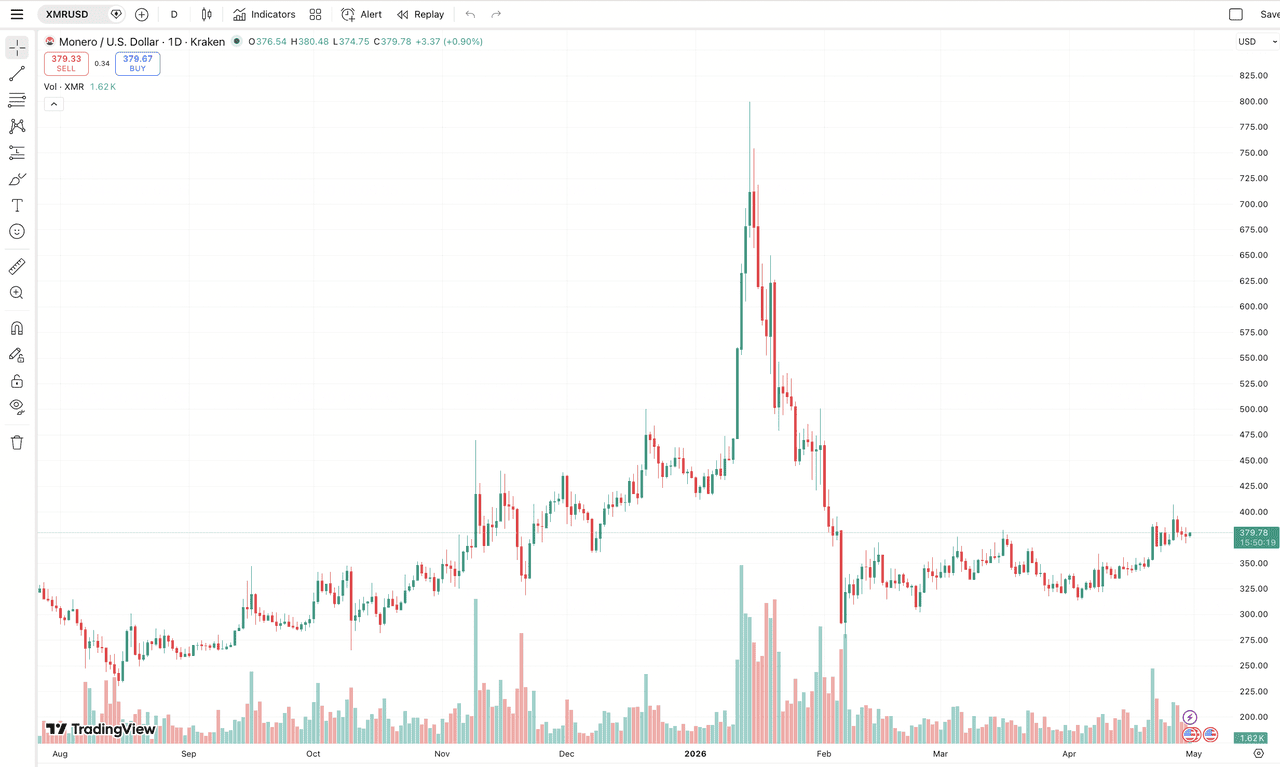
When it comes to desktop charts and market analysis, TradingView is almost the industry consensus choice. It supports XMR/USD and XMR/USDT and can connect to Kraken, BingX, and other exchange data. Users can select corresponding quotes based on the platform where they actually place orders, avoiding disconnection between analysis benchmarks and trading environments. Beyond basic charts, TradingView provides over a hundred technical indicators, drawing tools, and multi-timeframe switching, upgrading simple price displays into actionable judgment tools.
BingX's trading interface already embeds TradingView charts, so most users can complete observation and order placement directly within BingX. But for advanced users with more complex analytical needs, independent TradingView remains a more flexible choice where they can build complete indicator combinations and multi-condition alerts. When signals appear, they can switch back to BingX for execution. This "analysis, alerts, execution" division of labor workflow can maintain analytical precision while preserving trading efficiency.
TradingView Key Features
- Multiple Exchange Data Sources Available: Users can specify XMR data from specific platforms like Kraken, BingX as chart benchmarks, ensuring analytical environments align with actual trading conditions.
- Multi-Condition Alert System: Supports moving average crossovers, RSI overbought/oversold, volume expansion and other indicator triggers. Notification methods include browser, email, and app push notifications. Paid versions add Webhooks for Telegram or custom notification systems.
- Complete Historical Candlestick Data: Free accounts can view long-term data from daily charts and above. Paid versions support more detailed historical candlestick data, suitable for strategy backtesting.
- Works with BingX: Analysis and alerts completed on TradingView, order execution back to BingX. Clear division of responsibilities between tools actually improves overall efficiency.
3. CoinGecko
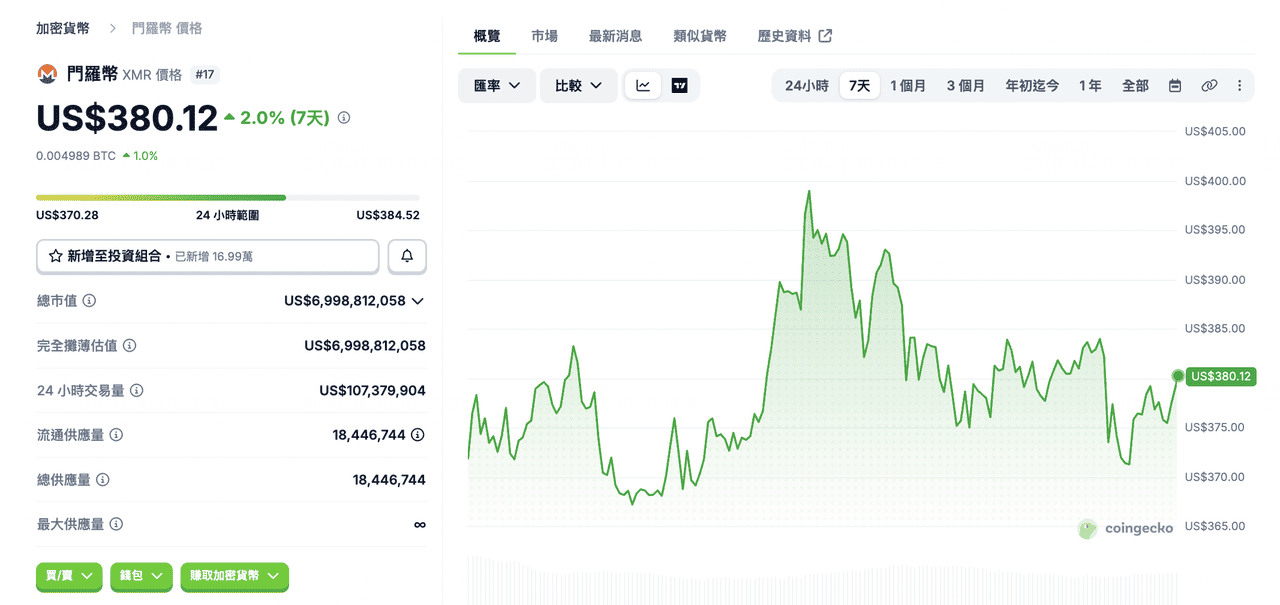
Besides price comparison functionality, CoinGecko's XMR coin page itself is a widely used "market benchmark" tool in the industry. Unlike exchange order books, CoinGecko's XMR/USD uses volume-weighted calculations from major global exchanges, better reflecting overall market consensus rather than partial market conditions from a single platform. In practical use, CoinGecko is usually not directly used for order placement, but to check whether current exchange quotes deviate from market averages before entering positions, avoiding unfavorable price transactions.
For example, before opening XMR/USDT perpetual futures positions on BingX, first check the overall price range on CoinGecko. If BingX's quotes significantly deviate from market consensus, you can observe a bit longer or adjust order timing. This "aggregate verification, exchange execution" working mode can improve the stability of transaction prices by one level.
CoinGecko Key Features
- Aggregated Weighted Quotes Reflecting Market Consensus: XMR/USD integrates weighted transaction data from major exchanges, serving as a benchmark for cross-platform comparison and confirming price ranges before entry.
- Complete Historical Data and Export Function: Provides complete XMR history since its 2014 launch, supporting CSV format export, very useful for trend research, calculating holding costs, or organizing trading records.
- Exchange Market Comparison Page: View real-time XMR quotes, 24-hour trading volume, and bid-ask spreads from various exchanges on the same page, enabling quick decisions before order placement.
4. CoinMarketCap
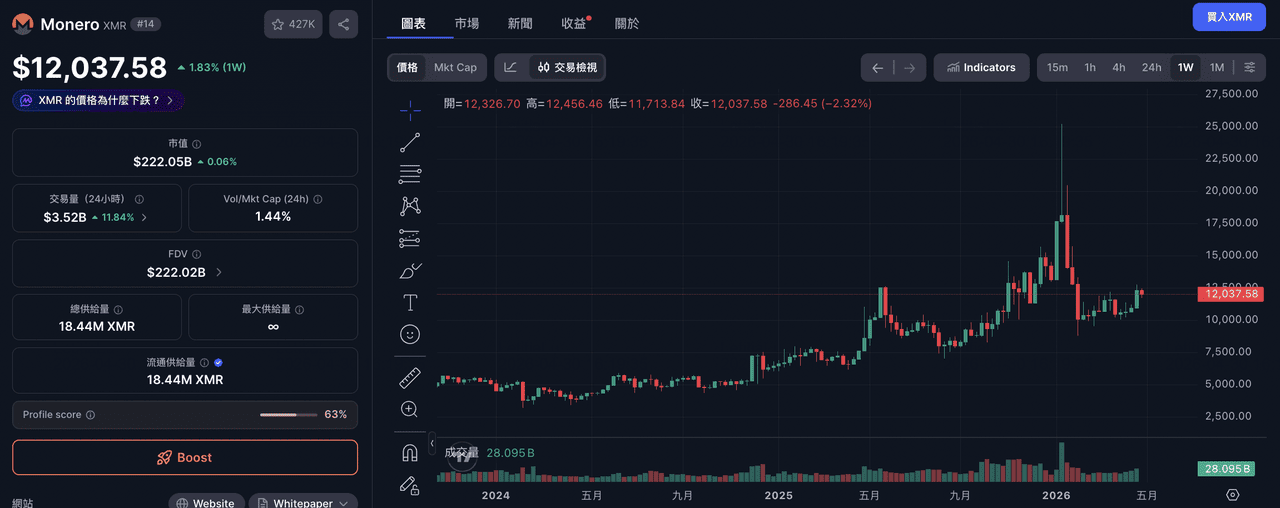
CoinMarketCap is similar to CoinGecko in role, providing XMR/USD aggregated quotes and market data, but the two have slight differences in information presentation preferences. CoinMarketCap's interface is relatively concise, centrally displaying core information like price, market cap, and gains/losses, suitable for users who need to grasp current market conditions in a short time. Its liquidity scoring mechanism provides another verification angle for quote credibility.
In practice, CoinMarketCap can serve as an alternative or cross-verification tool to CoinGecko. For example, before conducting larger XMR operations on BingX, first use CoinMarketCap to view current market consensus and liquidity distribution, which can further reduce judgment bias and make final transaction prices closer to market averages.
CoinMarketCap Key Features
- Liquidity Scoring Mechanism: Each exchange is assigned a liquidity score, helping users identify which quotes have actual trading support. For assets like XMR with concentrated liquidity, this indicator's filtering effect is more obvious.
- Market Sentiment Indicators: Integrates sentiment data like "Fear & Greed Index," which, while not directly used for order placement, still has reference value for judging overall market atmosphere.
- Concise Information Interface: XMR's core data (price, market cap, trading volume, gains/losses) is centrally presented, quite convenient for quickly confirming market status before entering trading platforms.
5. Messari
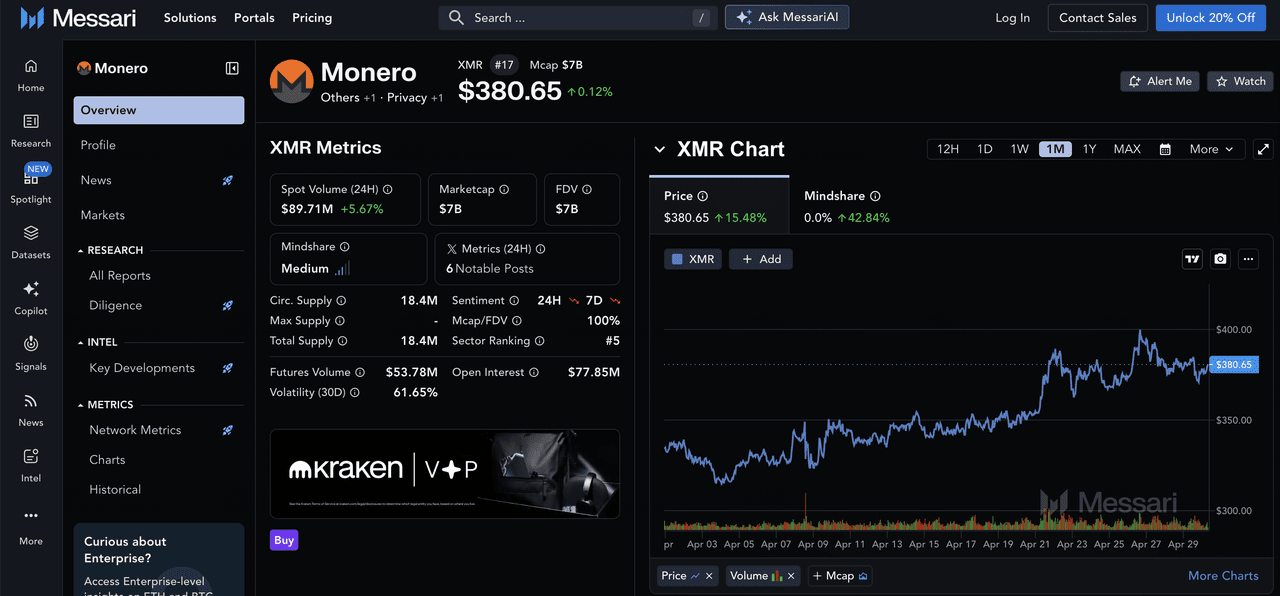
Messari takes an institutional-level research approach, belonging to advanced options among XMR tracking tools. While general tools focus on price and trading data, Messari delves deeper into market structure and long-term trends, such as trading volume changes, miner dynamics, and cross-exchange capital flows. It should be noted that due to XMR's use of privacy technology, many on-chain indicators common for BTC and ETH (active addresses, transaction counts) don't apply to XMR, so Messari's coverage depth for XMR is more limited than for mainstream coins, mainly focusing on market-side data. Messari's interface is only available in English, creating higher barriers for Chinese-only users.
From an application perspective, Messari is not a primary tool for daily price checking, but a supplement for long-term holding decisions or market research. The specific process could be: first see current price levels on CoinGecko or BingX, then go to Messari to further understand XMR's position in market cycles and capital flow directions, supplementing context that's not easily detected by just looking at prices. Although some in-depth data and reports require paid subscriptions, free functions are sufficient for basic research needs of individual investors.
Messari Key Features
- Market Structure Data: Indicators like trading volume, market cap ranking, and volatility help users understand XMR's long-term positioning from a market perspective rather than just looking at daily gains/losses.
- Historical Data and Market Context Analysis: Combines trading volume changes with major events (mainstream exchange delisting announcements, privacy coin regulatory policy changes) to help understand the causes behind price fluctuations.
- Research Reports and Advanced Data: Free version covers basic indicators, paid version (Messari Pro) provides more complete datasets and in-depth reports, very useful for medium to long-term investment judgments.
Desktop XMR Price Tracking Tool Comparison
|
Tool |
Quote Source |
Price Alerts |
Historical Data |
Suitable For |
|
BingX |
Platform order book real-time transaction prices |
Supported (app push, in-site alerts) |
Integrated TradingView candlesticks and technical charts |
Daily price tracking and real-time trading operations |
|
TradingView |
Multiple exchange data sources selectable |
Comprehensive (multi-condition, multi-notification methods) |
Complete candlestick history, paid version supports fine-grained data |
Technical analysis and advanced alert settings |
|
CoinGecko |
Aggregated exchange volume-weighted average price |
Basic (email alerts) |
Complete historical data, supports CSV export |
Market price benchmark comparison and data queries |
|
CoinMarketCap |
Aggregated exchange volume-weighted average price |
Basic (email alerts) |
Complete data, including market sentiment indicators |
Quick price checking and market overview assessment |
|
Messari |
Aggregated quotes + on-chain data |
Not provided |
On-chain indicators and cross-exchange data analysis |
Institutional-level research and fundamental analysis |
Best Mobile XMR Live Price Tracking Apps: Alerts, Monitoring, and Portfolio Tracking
Mobile devices play the role of "immediate response" in the XMR price tracking process. Compared to desktop versions that focus on in-depth analysis, mobile apps are more suitable for grasping current market conditions, receiving price alerts, and taking immediate action when opportunities are discovered. For users with actual trading needs, whether they can complete the "view price, judge, place order" process within the same app directly determines execution efficiency and final transaction prices. Therefore, choosing a well-integrated XMR tracking app is more important than seemingly having more features.
1. BingX App
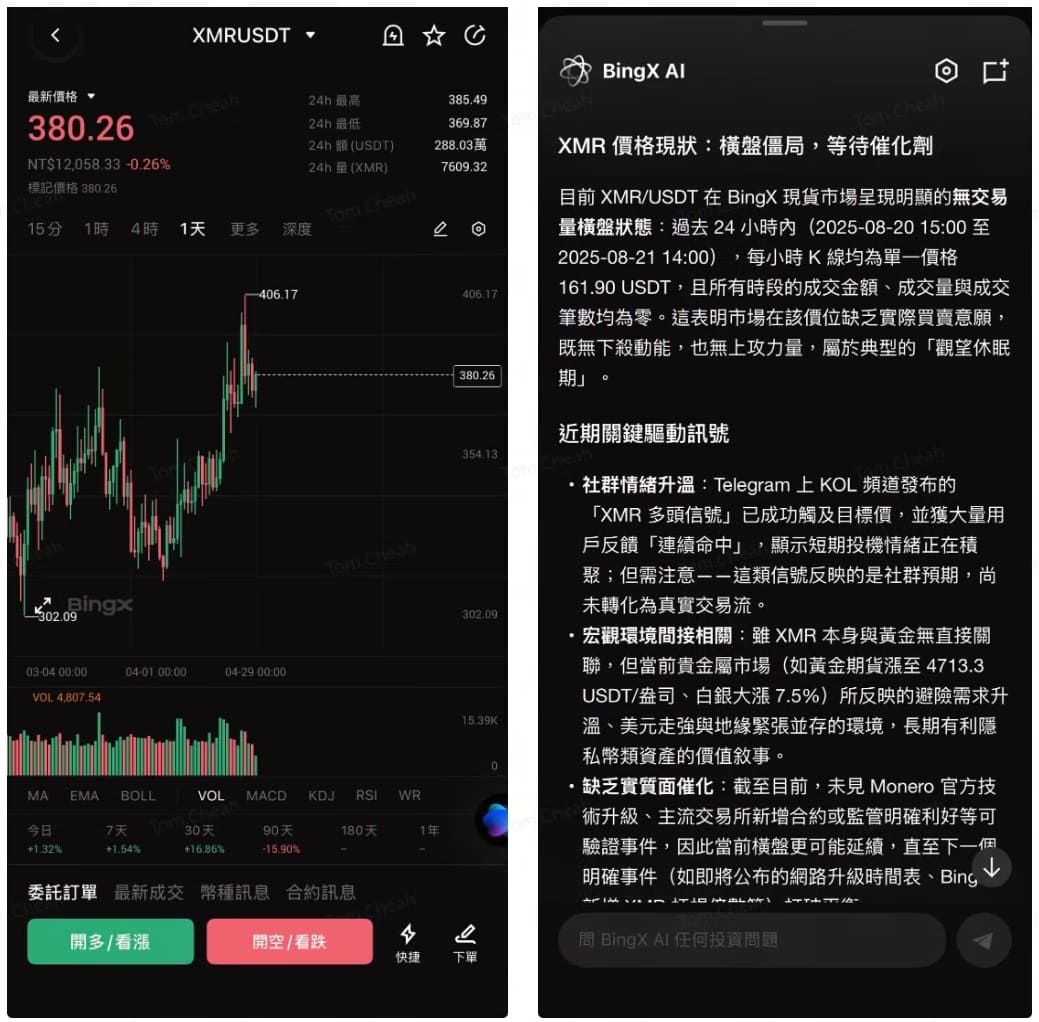
BingX's mobile app (iOS/Android) brings all desktop functions completely to mobile, with Traditional Chinese interface and all core tools intact, making it the most directly usable choice for Taiwanese XMR investors when away from home. XMR/USDT perpetual futures' real-time quotes, candlestick charts, depth charts, and transaction records are all concentrated in the same interface, eliminating the need to switch between multiple apps and maintaining complete observation and operation capabilities on mobile devices.
Its biggest difference from general price-checking apps is integrating "market data, alerts, trading" into the same process. Once set XMR target prices are triggered, users can directly jump from push notifications to trading pages, confirm current conditions, and execute immediately, saving time from opening other tools. This is particularly useful for users who need quick responses during commutes, meeting breaks, or non-working hours. BingX AI and copy trading functions are equally complete on the app side, with copy trading operations allowing direct browsing of trader performance and activation on mobile without needing to return to computers for management.
BingX App Key Features
- Full Traditional Chinese Interface: All pages, menus, and customer service channels are in Chinese, reducing mistouch risks even during quick operations while away.
- Price Alerts Direct to Trading: After XMR target price triggers, users can directly enter trading pages from push notifications to complete orders, greatly compressing time from signal to execution.
- Complete Candlesticks and Technical Indicators: Multiple timeframes and common technical indicators all support touch operation, maintaining basic trend judgment capabilities on mobile.
- Mobile Copy Trading: Browse XMR copy trading trader performance and directly activate within the app, completing the entire process on mobile.
2. CoinGecko App
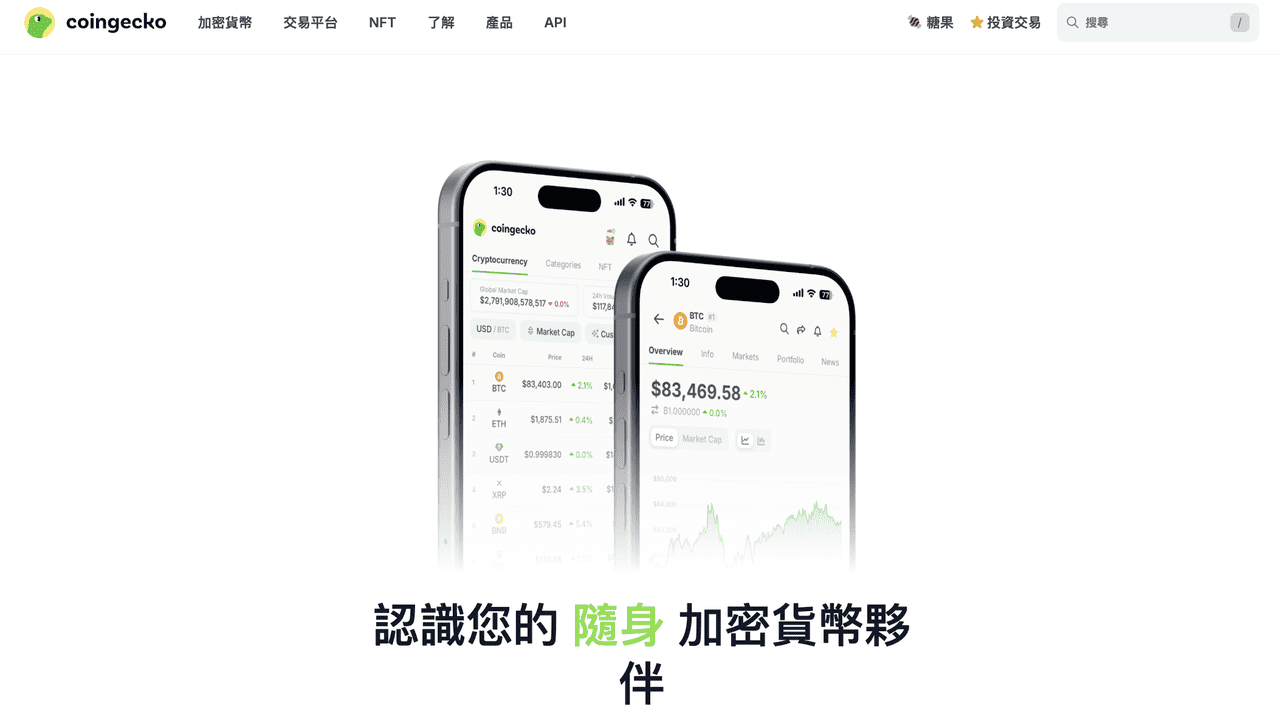
CoinGecko's mobile app is a pure price-checking tool that doesn't support trading, with usage scenarios focused on observing XMR prices and overall market conditions. Through the watchlist function, users can add XMR and other assets of interest to a single page, grasping real-time prices, 24-hour gains/losses, and market cap changes at once. The interface is clean with appropriate information density. Quotes are based on aggregated volume-weighted averages, reflecting global market consensus rather than transaction prices from a single platform, making it more suitable as a benchmark reference tool.
Typical usage is pairing it with BingX App: before opening positions on BingX, first open CoinGecko to confirm XMR's current market range and overall sentiment, then switch back to BingX for actual operations. This "aggregate price checking, exchange execution" two-layer process can reduce misjudgments caused by short-term volatility on single platforms.
CoinGecko App Key Features
- Watchlist: Add XMR and other tracking targets to the list without needing to search each time, convenient for establishing stable price-checking habits.
- Aggregated Quote Reference: XMR/USD integrates volume-weighted calculations from major exchanges, suitable for confirming market consensus ranges before actual entry.
- Basic Price Alerts: Supports upper and lower price trigger push notifications with simple setup process, meeting general daily monitoring needs.
- Market Overview Quick View: Integrates macro data like total market cap, BTC dominance, and fear & greed index, enabling understanding of overall market status in the shortest time.
3. Delta App
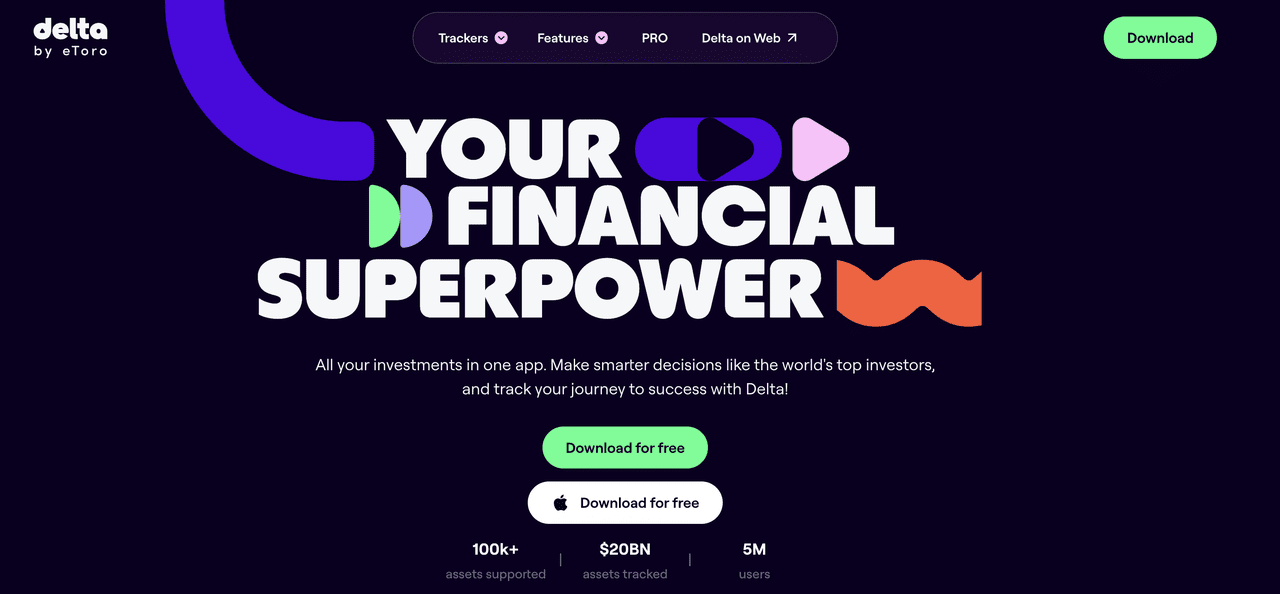
Delta's core positioning is portfolio management, with main functions not in price checking but tracking overall asset profit and loss changes. Users can manually input XMR positions or use APIs to sync exchange accounts, automatically obtaining cost, current value, and return rate information. For investors holding multiple crypto assets distributed across different platforms, Delta can centrally present scattered data on one screen, saving the trouble of opening individual platform apps one by one. It should be noted that Delta doesn't provide Traditional Chinese interface, creating higher barriers for Chinese-only users.
From an application perspective, Delta is more like an "asset dashboard" rather than a trading tool. Users can grasp XMR's proportion and performance in their overall investment portfolio on Delta, then return to platforms like BingX for actual operations, forming a three-stage division of "asset monitoring, price judgment, order execution," particularly suitable for those focused on long-term holdings who don't trade frequently.
Delta App Key Features
- Portfolio P&L Tracking: After inputting XMR purchase costs, automatically calculates unrealized gains/losses and returns, with cross-platform holdings integrated on the same screen.
- Flexible Price and Percentage Change Alerts: Besides general target price alerts, also supports percentage gain/loss alerts (e.g., 24-hour gains exceeding 5%), with more detailed monitoring dimensions than basic tools.
- Multiple Exchange Quote Sources: Can select XMR quotes from different exchanges as benchmarks, convenient for aligning with platforms actually used.
- Asset Management-Focused Interface: Doesn't provide trading functions, with overall design centered around position and performance tracking, suitable for asset monitoring-oriented usage scenarios.
4. TradingView App
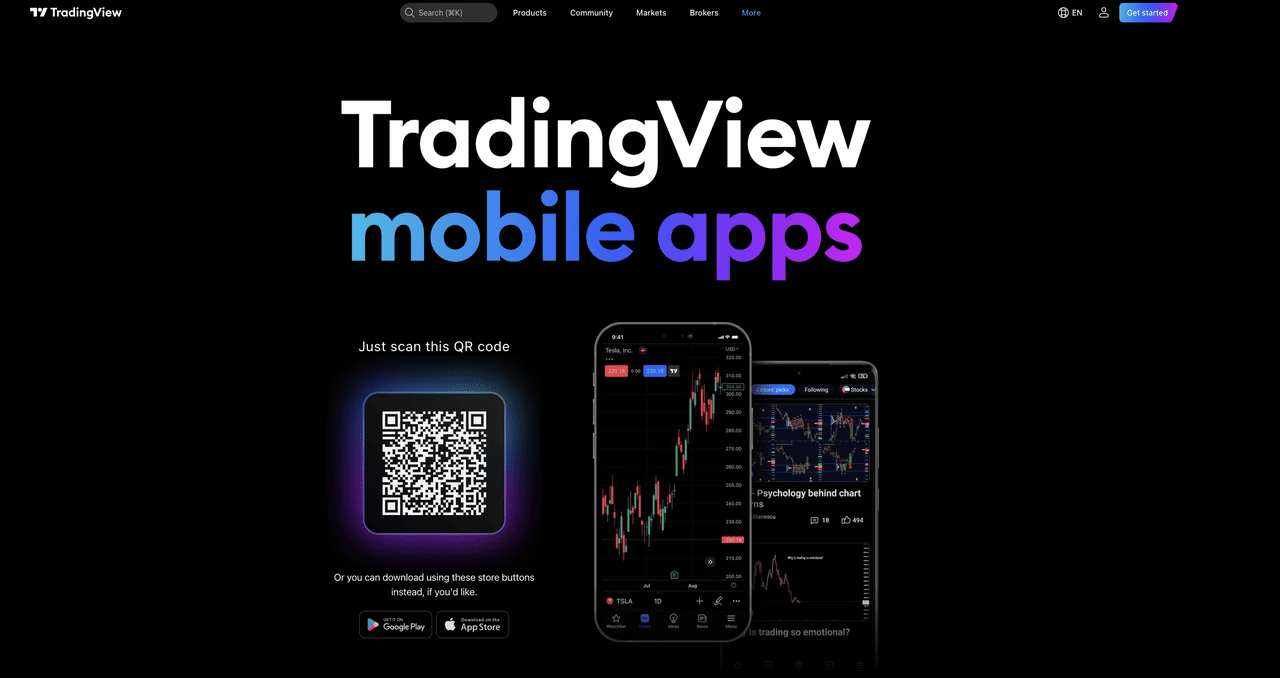
TradingView's mobile app brings the desktop version's charts and alert systems completely to mobile, providing seamless connection for users already using the desktop version. Candlesticks, technical indicators, and drawing tools are all redesigned for touch, without sacrificing analytical capabilities due to smaller screens. XMR alerts set on desktop are synchronized to mobile push notifications, enabling real-time signal reception when away without needing to reset everything.
This app's role leans more toward "signal reception and auxiliary judgment." Common usage is: complete comprehensive XMR analysis and multi-condition alert settings on computers, receive push notifications on mobile when away, and after seeing signals, switch to BingX App for trade execution. This workflow preserves both analytical precision and trading immediacy, quite practical for users pursuing precise entry and exit timing.
TradingView App Key Features
- Desktop Alert Sync Push: XMR price and technical indicator alerts set on desktop automatically push to mobile without duplicate setup.
- Complete Charts and Technical Analysis Tools: Multiple timeframes, technical indicators, and drawing tools all support touch, with mobile analytical depth close to desktop version.
- Multiple Exchange Data Sources: Can switch XMR data from different exchanges, ensuring charts align with actual operating platforms.
- Seamless Mobile-Desktop Connection: Analysis, alerts, and signal reception sync across devices, forming a complete observation-to-execution process when paired with BingX App.
Mobile XMR Price Tracking Tool Comparison
|
App |
iOS / Android |
Quote Source |
Price Alerts |
Suitable For |
|
BingX App |
Both supported |
Platform order book real-time transaction prices |
Supported (direct trading after push) |
Taiwanese users needing real-time market tracking with direct trading operations |
|
CoinGecko App |
Both supported |
Aggregated volume-weighted average price |
Basic price alerts (push) |
Users needing daily price checking and grasping overall market price ranges |
|
Delta App |
Both supported |
Multiple exchange quotes selectable |
Supported (including percentage change alerts) |
Multi-asset portfolio management and P&L tracking needs |
|
TradingView App |
Both supported |
Multiple exchange data selectable |
Comprehensive (synced with desktop) |
Users already using technical analysis needing mobile signal reception |
How to Check XMR Live Price and Set Price Alerts on BingX
Among all the desktop tools mentioned, BingX is one of the few Traditional Chinese platforms that can connect "XMR market data, technical analysis, and futures execution." The learning curve for Taiwanese users is relatively gentle here, and the setup process for price tracking and alerts is quite intuitive. Desktop and mobile app setup logic is basically consistent. Below are actual operation steps suitable for daily continuous monitoring of XMR/USDT perpetual futures price dynamics.
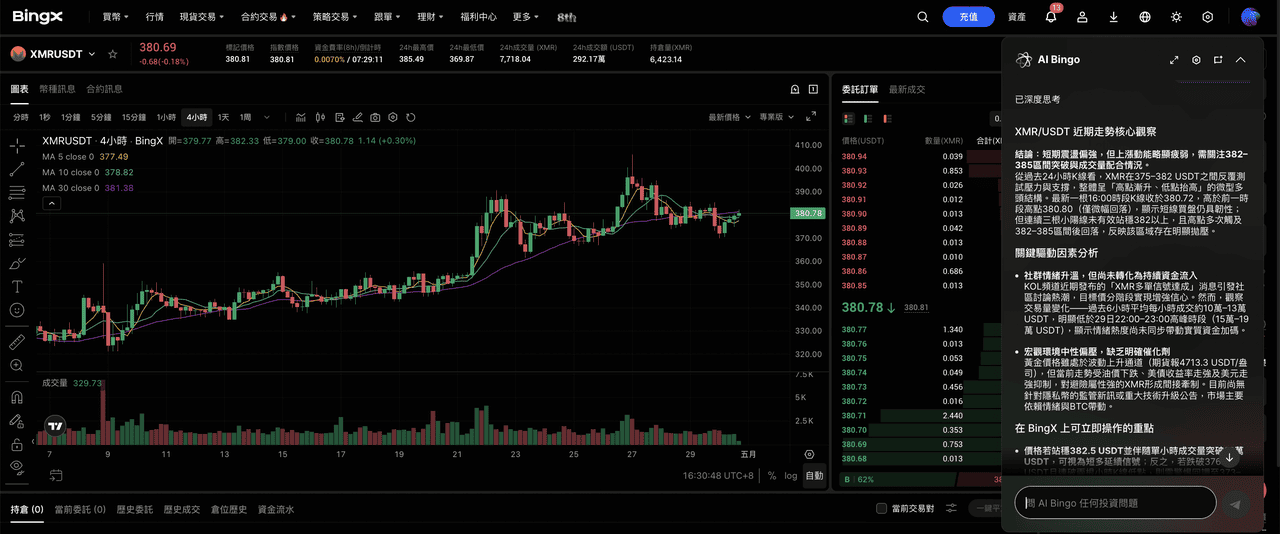
1. Enter XMR/USDT Perpetual Futures Trading Page: Register and log into BingX account, enter "Futures Trading" from the top menu, search for XMR/USDT and enter that trading pair's market page. The page will display real-time transaction prices, funding rates, order books, and latest transaction records, serving as the starting point for all subsequent operations.
2. View Real-time Market Data and Candlestick Charts: The top of the page shows XMR/USDT current price, 24-hour high/low, trading volume, and gains/losses. The chart below comes from TradingView, allowing switching between 1-minute to monthly timeframes and overlaying technical indicators like moving averages, RSI, MACD to judge trends and support/resistance zones. For users not skilled at interpreting charts themselves, BingX AI can be opened simultaneously for structured market observations.
3. Set Price Alerts: Find the "Alert" button on the chart or trading page, input desired target price and trigger conditions (above or below set price), then select notification method (app push or in-site messages). It's recommended to set one alert each at upper resistance and lower support levels, so neither breakouts nor breakdowns are missed.
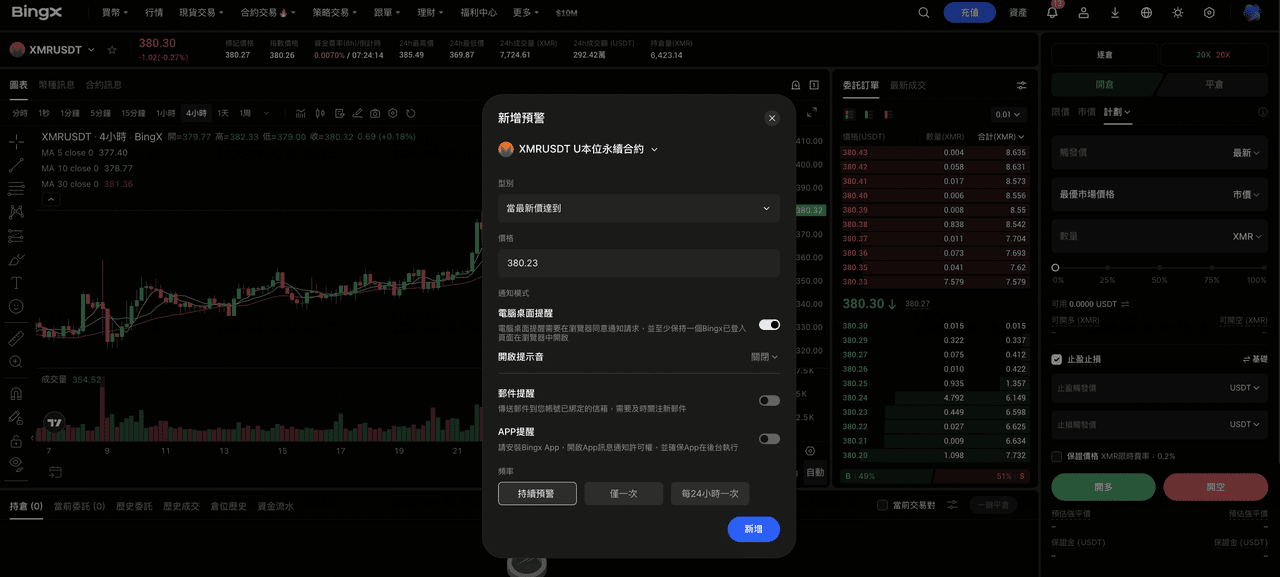
4. Manage Created Alerts: Enter the "Alert Management" page to browse all currently active alert lists and adjust target prices or delete unnecessary conditions anytime.
5. Direct Trading After Receiving Alerts: When XMR reaches set conditions, the system will push real-time notifications. Clicking the notification jumps directly to the XMR/USDT trading page where you can confirm current market conditions and place orders immediately without switching to other tools. For users who don't intend to judge entry/exit timing themselves, XMR copy trading traders can also be selected from the same interface to automatically follow their operation strategies.
5 Key Tips for Using XMR Price Tracking Tools Effectively
When using various XMR tracking tools, each platform's pricing logic and functional positioning actually differ significantly. If these differences aren't understood clearly, it's easy to encounter gaps when judging or placing orders. Below are five details that are easily overlooked but have significant practical impact.
1. Aggregated Quotes Don't Equal Actual Transaction Prices: CoinGecko and CoinMarketCap's XMR/USD are volume-weighted averages from multiple exchanges, reflecting overall market ranges rather than actual transaction prices from any single platform. Before preparing to place orders, be sure to return to your exchange to confirm current order books and bid-ask spreads, avoiding mismatches between "seen prices" and "executed prices."
2. XMR/USD vs XMR/USDT Quote Base Differences: Most of the time, XMR/USD and XMR/USDT spreads are small, but when encountering major market volatility or USDT depegging, the two may open significant distances. Taiwanese users typically operate XMR/USDT on BingX. When referencing CoinGecko's XMR/USD aggregated prices, remember the different pricing bases and don't directly use them as order placement references.
3. Privacy Coin Liquidity Differences Amplify Spreads: XMR spreads between different platforms are usually more pronounced than BTC and ETH, especially for large transactions or non-mainstream hours when slippage impact may be worse than expected. There's also delay from seconds to tens of seconds between price alert triggers and actual delivery. During rapid XMR volatility, markets may have already moved. Treat alerts as "signals approaching target zones" rather than precise entry/exit bases for more realistic usage scenarios.
4. Regulatory Developments Take Priority Over Technical Signals: For XMR, mainstream exchange delisting announcements, specific region privacy coin bans, and regulatory events for similar projects often overturn original technical analysis judgments in short periods. Spending a few minutes before each operation to confirm recent regulatory developments is a basic action to reduce extreme risks - a risk characteristic that BTC and ETH investors encounter less frequently.
5. Distinguish Analysis Tools from Trading References: CoinGecko's historical data and Messari's market structure indicators are suitable for long-term trend judgment and research, but these tools aren't designed for real-time trading. When actually placing orders, use exchange order book prices as the standard, separating "research analysis" and "trading decisions" into two distinct phases to effectively reduce gaps between judgment and execution.
Final Thoughts: Why BingX Is a Top Choice for XMR Price Tracking
Tracking XMR prices usually involves using multiple tools together, each responsible for different aspects. CoinGecko and CoinMarketCap can be used to confirm market prices and overall consensus, TradingView provides technical analysis and chart tools, Messari supplements research and background information, and Kraken Pro suits scenarios requiring spot trading. Through this division of labor, market information can be cross-verified at different levels, improving judgment stability.
Within such tool combinations, BingX is more suitable as the main observation and operation portal. Due to privacy coin-related compliance considerations, XMR spot trading is currently not provided, but through XMR/USDT perpetual futures, it can still meet most needs focused on market participation while integrating real-time quotes, charts, and price alert functions. For Taiwanese users, Traditional Chinese interface and mobile support also make the overall usage process more consistent. In practice, BingX can serve as the main operating platform with other tools as auxiliary references, establishing fixed usage habits that help with long-term tracking and execution.
Further Reading
- What is Monero (XMR) Privacy Coin and How Does It Work?
- Which Trading Platform to Choose for Monero to USD (XMR/USD) in Taiwan in 2026? Comparison of Fees and Security of 5 Major Platforms
- 2026 Monero Wallet Recommendations: Which XMR Wallet is Most Suitable for Taiwanese Users?
- Where to Buy Bitcoin in Taiwan? 2026 Bitcoin Exchange Recommendations and Complete Purchase Process Tutorial
- Taiwanese Exchanges vs. International Exchanges: How to Choose the Right Cryptocurrency Trading Platform for You?
